

Vue
Two ways
- The Node.js handler — the panel builds the application itself after every Git deploy and serves it via the
servepackage. This way is described below. - The "Static" handler — if you build the application on your computer or in CI and upload the ready
dist: the document root is the build folder, plus the directivetry_files {path} /index.html.
1. A project on Node.js
- Add
serveto the application's dependencies and a start script topackage.json:
With"scripts": { "build": "vite build", "start": "serve -s dist -l tcp://0.0.0.0:$PORT" }-sthe server returnsindex.htmlfor any route — this is what makescreateWebHistory()work. - Create a project with the Node.js handler. Build command:
cd src && npm ci --include=dev && npm run build. Start command:cd src && npm start.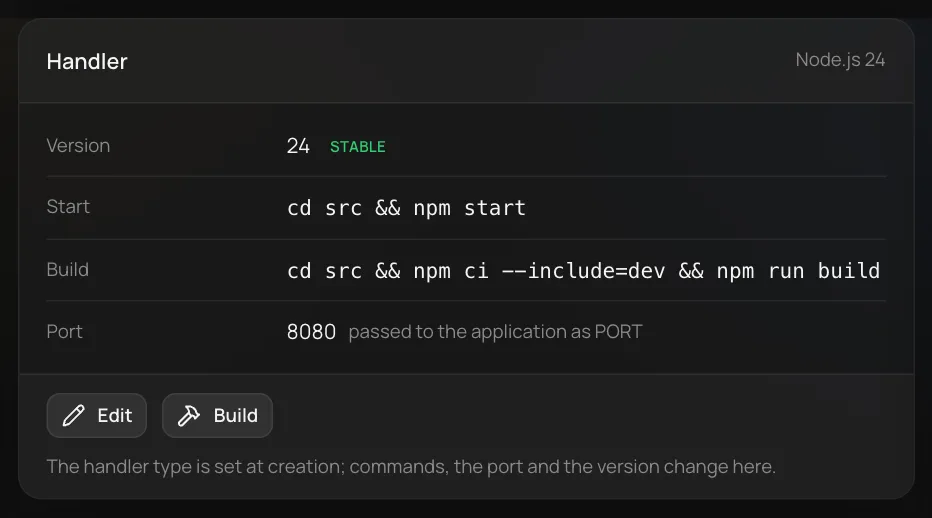
The build and start commands in the "Handler" block. - Connect the repository in the Git deploy block with the
srcdirectory and click "Deploy".
2. Variables
VITE_* variables are embedded into the code at build time: set them in the "Environment variables" block and rebuild the project.
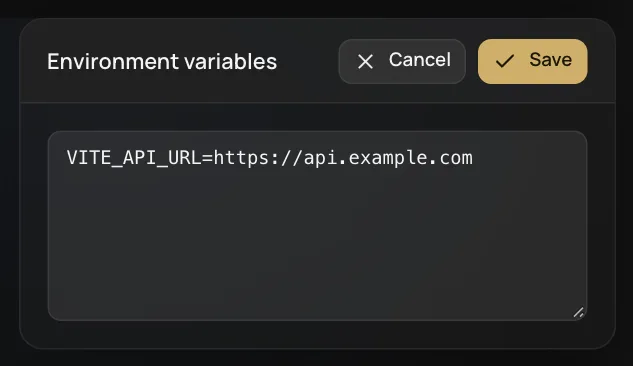
VITE_* variable in the block; after saving — "Deploy" or "Build".3. If something goes wrong
- 404 on
/aboutafter reloading the page.servewas started without-s. - 502.
serveis not listening on$PORTor is bound tolocalhost— the address must betcp://0.0.0.0:$PORT. - "vite: not found" during the build.
npm ciwithout--include=dev.