

Next.js
1. Project
- Create a project with the Node.js handler (version stable). For Next.js, take a plan with 1 GB of memory or more; for 512 MB, see section 3.
- Build command:
cd src && npm ci --include=dev && npm run build--include=devis required: TypeScript, Tailwind and other build tools are indevDependencies. - Start command:
cd src && npm start—next starttakes the port from thePORTvariable by itself.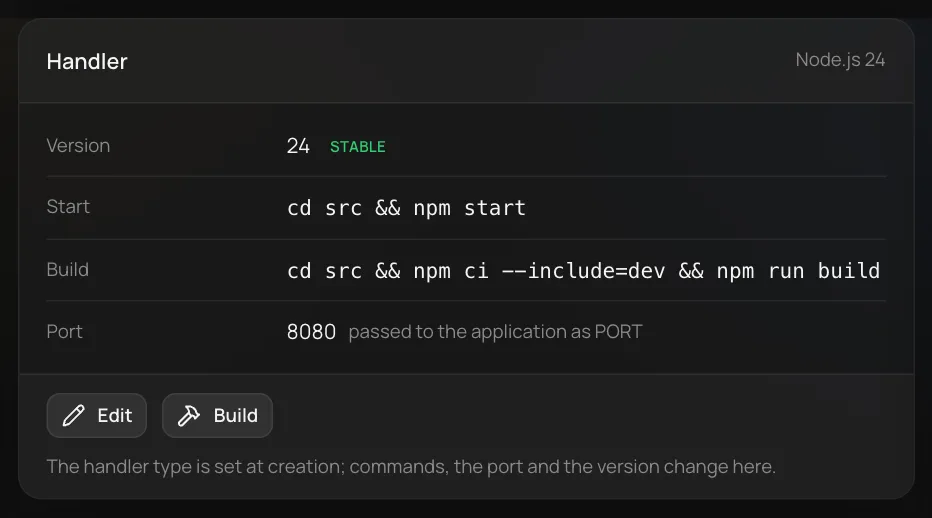
The build and start commands in the "Handler" block. - Connect the repository in the Git deploy block with the
srcdirectory and click "Deploy".
2. Environment variables
- Variables from the "Environment variables" block are available both during the build and at run time.
NEXT_PUBLIC_*are embedded into the client code at build time — after changing them, rebuild the project ("Deploy" or "Build"). - To turn off Next.js telemetry:
NEXT_TELEMETRY_DISABLED=1.
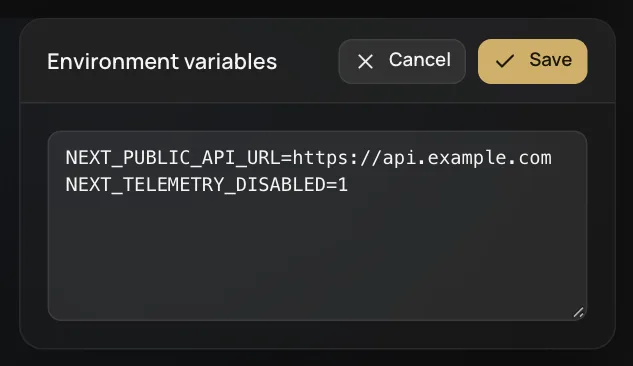
NEXT_PUBLIC_*, rebuild.3. A small plan: standalone and webpack
On a 512 MB plan a Turbopack build may not fit even with the extra memory during the build. Then build with webpack and a limited heap, and run the compact standalone server:
// next.config.ts
const config = { output: "standalone" };
export default config;
# build command
cd src && npm ci --include=dev && NODE_OPTIONS=--max-old-space-size=384 npx next build --webpack && cp -r public .next/standalone/ && cp -r .next/static .next/standalone/.next/
# start command
node src/.next/standalone/server.js4. If something goes wrong
- "Next.js build worker exited … SIGKILL" or code 137. The build is short of memory — see section 3 or choose a more powerful plan.
- "Could not find a production build". The server was started without a build: check that the build command succeeded (the deploy output,
logs/build.log). next/imageimages are not optimized. Thesharppackage is installed fromdependencies; if it is not there, add it.